---
title: "List Display"
url: "https://aide.sigabill.siga.net/en/article/new-article-5bc50ca7-7410-4c40-9ec0-50edb5775979"
language: "en"
last_updated: "2026-10-26T14:33:53.889Z"
---
# List Display
The display of lists can be modified instantly in just a few clicks. Column headers are clickable cells that can affect the display. When closing the sheet, changes are not saved.
The table below shows the possibilities and how to achieve them.
| ### **How to...** | |
| --- | --- |
| #### Display documents in a **specific order** | Click on the desired column header; the display will be modified according to this column
- First click on the header = **↑ = ascending order**
- Second click on the same header =**↓** \= **descending order** |
| #### **Move a column** | - Click on the column header to move
- Hold down the left mouse button a column
- Move the column to the desired location |
| **Hide a column** | - Right-click on the column header
- Select the item "Hide Column" |
| #### **Show** a column | - Right-click on the column header line
- Select the item "Choose Columns"
- Check the column or columns to display |
| #### Display deposits by grouping | - Click on the settings wheel to the left of the Date column
- Select the item "Show Grouping Area"
- Drag one of the columns into the gray area reserved for groupings |
| #### 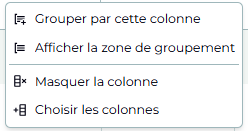 | This menu appears when right-clicking on one of the column headers. The menu allows to:
- choose which columns to display or hide
- group results by column |
* * *
Sigabill is an application developed by SIGA Informatique 2000 inc,