
Understanding the Invoice - Invoice Summary
The Invoice Summary updates as soon as information is added to the invoice.
Example of an Invoice Summary
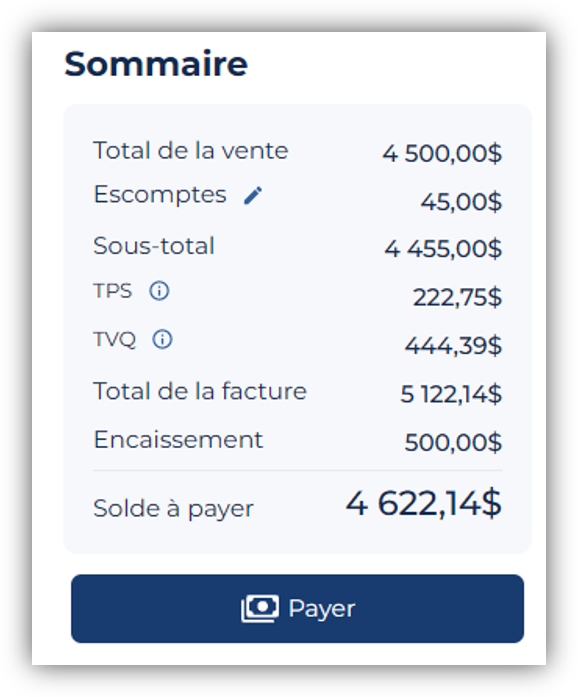
Invoice Summary Items
Sales Total
Contains total sales
Discounts
Product and customer discounts are applied to the invoice. Early payment discounts are not included and are not reflected in this line. To add or edit a product or customer discount, click the Actions button at the end of the product line or the pencil icon to the right of the Discounts label.
Subtotal
The subtotal is calculated by the application: Total - Product discounts.
Taxes
Taxes apply according to the tax settings in the Client Profile. Tax codes and rates apply according to the invoice date and effective date. Taxes are calculated on each taxable product and not on the invoice total. To view detailed tax information, click the Actions button at the end of the product line.
Invoice Total
The invoice total is calculated by the application: Subtotal + Taxes
Payment received
The payments received displayed in the Invoice Summary are the payments entered for this invoice. You can enter a partial payment, a full payment, or multiple payments.
Balance due
The balance due is calculated by the application: Invoice Total - Payments received. The client's balance is not displayed on the current invoice. Therefore, if advance payments were recorded, they will not be applied to the current invoice.
 Sigabill is an application developed by SIGA Informatique 2000 Inc.,