
Add an advance payment
Advance payments are cash receipts that have been received for which no invoice has yet been produced and recorded. In the current version of the application, a "negative" invoice must be created to record the advance payment.
- Create a negative invoice with the "Advance Payment" product/service; the deposit will appear in the bank reconciliation after importing this invoice.
- The customer balance is in credit; if a statement of account is printed, the negative balance will be displayed.
- Create the actual invoice
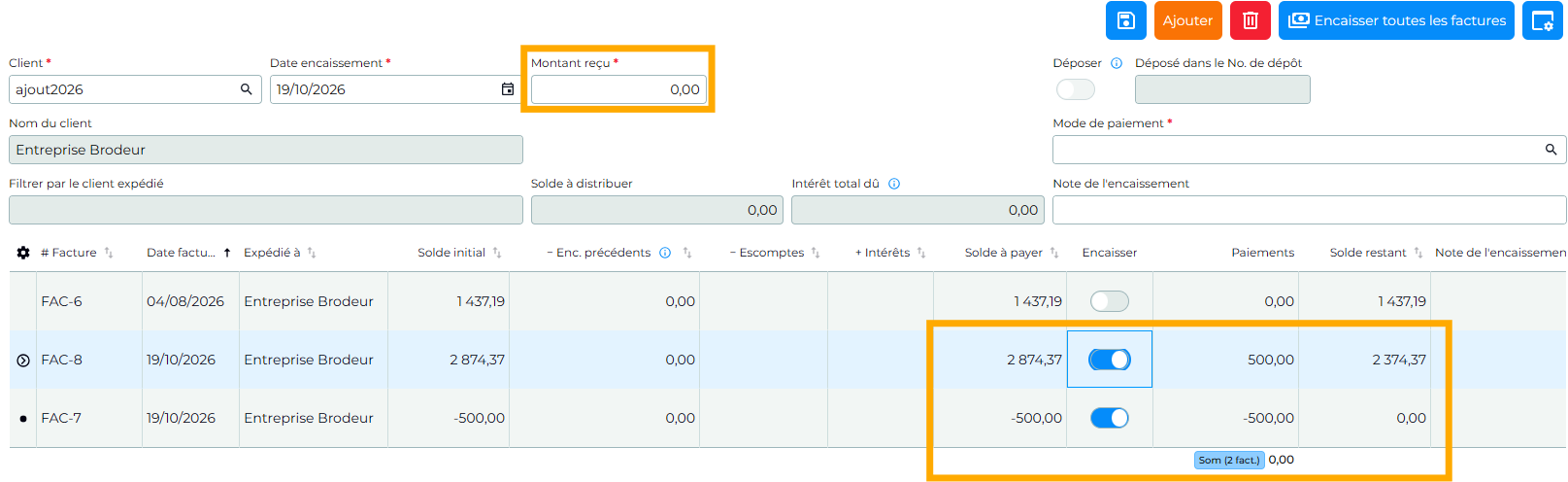
- Apply the advance payment to the actual invoice by adding a $0 receipt and selecting both the negative invoice and the actual invoice. No amount will be deposited since the amount received is equal to $0. The customer file will contain the details of the transactions.
To add an "Advance Payment" product/service
You need to add a non-taxable product/service named Advance payment by following these steps:
- Go to the menu Products and services
- Click on the button Add
- Complete the file for this product/service by specifying the code and name
- Select or Add the Product/service category for Advance payments. It is very important to ensure that the Tax exception is "Exempt supplies"
- Choose the sales unit: Units
When importing this invoice into SigaFinance EVO, you will need to link the bank account to the new Product/service category so that the amount of the Advance payment appears in the bank reconciliation.
💡Video clip - How to manage advance payments?
The clip is only available in French
 Sigabill is an application developed by SIGA Informatique 2000 inc,
Last updated: 10/19/26, 5:36 PM